Bring the right files.
Navigate your project in the file explorer. Drag and drop files and images into chat attachments.
OPEN-SOURCE AI AGENT WORKSPACE
Run Codex, Claude Code, and Antigravity from one persistent workspace. Bring files and designs from ChatGPT, Claude, Gemini, and other web assistants directly into your coding workflow.
Codex · Claude Code · Antigravity
ChatGPT · Claude · Gemini · Copilot · Mistral
01 / THE WORKFLOW
Start with a conversation. Keep the files, context, and tools with you all the way to a commit.
Open ChatGPT, Claude, Gemini, Copilot, Mistral, or web search in Hopper’s assistant browser.
Web assistants & searchBring generated documents, images, HTML, React code, ZIP files, and conversation bundles into Bridge.
Preview before importingAttach imported files to your active chat. Continue with Codex, Claude Code, or Antigravity.
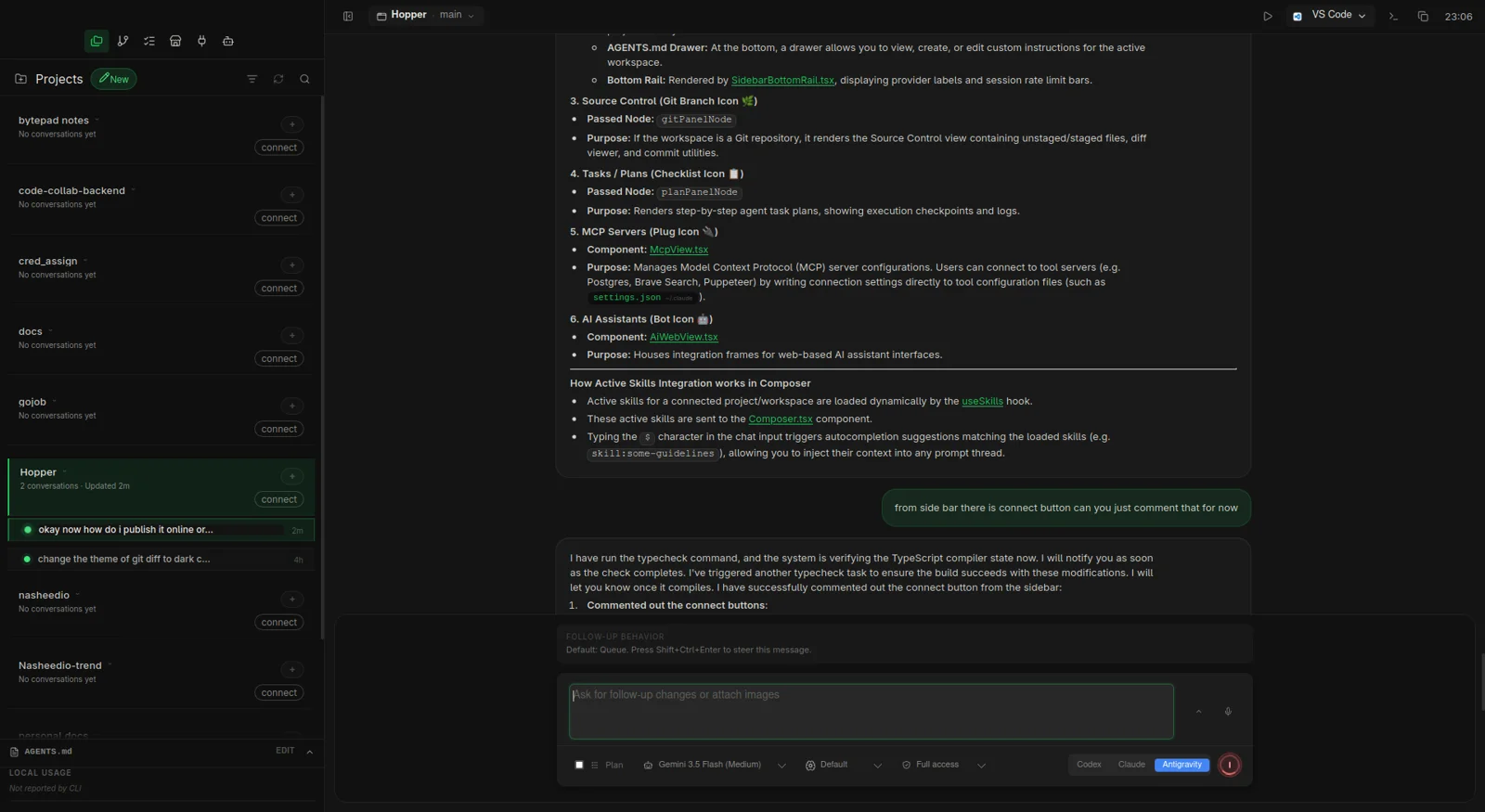
Your selected coding threadInspect files, terminal output, Git changes, diffs, branches, issues, and pull requests in one workspace.
From prompt to commit02 / CODING AGENTS
Switch providers without switching projects. Persistent conversations and browser-style tabs keep your work ready to resume.
ONE WORKSPACE / MULTIPLE ENGINES
Connect your providers. Keep your conversations.
03 / HOPPER BRIDGE
The design you explored in a web assistant becomes context for your coding agent. Review the files in Bridge, then import them into your active workspace and selected chat.
Preview first. Import when ready. Files are never automatically executed.
Generated files & downloads
Preview files before they enter your project
Your workspace, your selected chat
04 / ASSISTANT BROWSER
Open web assistants and general search in browser-style tabs. Keep multiple sessions alongside your coding workspace; assistant downloads appear in Bridge for review.
ChatGPT, Claude, Gemini, Microsoft Copilot, and Le Chat Mistral are web assistants. Codex, Claude Code, and Antigravity handle your coding-agent workflow.
EXPLORE WITH YOUR OWN ACCOUNTS
Research → Downloads → Bridge review
05 / LOCAL DEVELOPMENT
Your everyday development tools, alongside your agent conversations.
Navigate your project in the file explorer. Drag and drop files and images into chat attachments.
Run commands and inspect terminal output without leaving the workspace.
Inspect status and diffs, manage branches, and work with GitHub issues and pull requests using your local tooling.
Use Git worktrees for isolated agent tasks and keep parallel changes in separate working directories.
06 / EXTENSIONS
Connect MCP servers, discover reusable skills, and use the developer tools already on your machine. Work with cloud or local models through your configured providers.
Explore the project documentationConnect tools and external context.
Reuse workflows across your agents.
Choose your models and subscriptions.
07 / LOCAL FIRST
Hopper operates against local workspaces. Connect your own provider accounts and decide how your tools access your project.
Connected AI providers process requests under their own policies. Local workspaces do not mean that every provider request stays on your device.
08 / OPEN SOURCE
Read the code, report a bug, or contribute your next improvement. Hopper is available under the MIT license.
Built on CODEXmonitor by Thomas Ricouard (Dimillian). The upstream copyright and MIT license are preserved.
09 / START BUILDING
Choose the build for your operating system and processor.
Release v1.0.1 · Checking for the latest release…
Bring your own provider accounts. Hopper does not include subscriptions to AI services.
10 / GOOD TO KNOW
Hopper is an open-source desktop workspace that brings coding agents, web assistants, files, terminals, and Git workflows together.
Codex, Claude Code, and Antigravity. Web assistants such as ChatGPT and Claude are available separately in the assistant browser.
No. Connect your own Codex, Claude Code, or Antigravity account and meet the provider’s requirements. Hopper does not bundle subscriptions.
Hopper detects missing providers and offers guided installation and sign-in. Requirements depend on your platform and chosen provider.
Bridge is the review and import step between web-assistant downloads and your local project. Preview files, then attach them to your active workspace and selected chat.
Yes. Bring generated documents, HTML, code, images, ZIP files, or conversation bundles into Bridge, review them, and import the files you want.
No. Importing files does not execute them. You decide what to do with them in your development workflow.
Yes. Hopper works against local workspaces. AI providers may process requests remotely. An optional remote daemon mode lets you explicitly connect to another machine.
The download section lists only builds present in the latest GitHub release, with the operating system, processor architecture, and file type. Check GitHub Releases for all versions.
Yes. Use worktrees to give agent tasks isolated working directories and keep parallel changes separate.
Yes. Connect MCP servers and use the skills marketplace to extend your workflows with tools and reusable instructions.
Yes. The public repository is licensed under MIT, with upstream copyright retained.
Open an issue in the Hopper GitHub issue tracker. Include your platform, Hopper version, and steps to reproduce.